If the Factory pattern clicked for you but you’ve ever found yourself thinking “I don’t just need one thing I need a whole set of things that match each other,” you’re already halfway to understanding Abstract Factory.
The Abstract Factory pattern is about creating families of related objects without specifying their concrete classes. Not just “give me a notification sender” but “give me a complete notification kit for mobile: the sender, the formatter, and the delivery tracker, all built for mobile, all guaranteed to work together.”
One step up from Factory. Significantly more powerful when you need it.
The Problem: One Factory Isn’t Enough When Things Need to Match
You’re building a notification system that runs across three platforms, let’s say mobile (iOS/Android), web (browser), and desktop (Electron app). Each platform needs three things: a sender to deliver the notification, a formatter to shape the message correctly for that platform, and a tracker to log delivery status.
The naive approach with a regular factory starts to crack almost immediately:
# BEFORE: Separate factories that don't know about each other
from notifications import (
    MobileSender, WebSender, DesktopSender,
    MobileFormatter, WebFormatter, DesktopFormatter,
    MobileTracker, WebTracker, DesktopTracker,
)

def send_notification(platform: str, user, message: str):
    # Three separate decisions, nothing enforcing they match
    if platform == "mobile":
        sender = MobileSender()
    elif platform == "web":
        sender = WebSender()
    elif platform == "desktop":
        sender = DesktopSender()

    if platform == "mobile":
        formatter = MobileFormatter()
    elif platform == "web":
        formatter = WebFormatter()
    elif platform == "desktop":
        formatter = DesktopFormatter()

    if platform == "mobile":
        tracker = MobileTracker()
    elif platform == "web":
        tracker = WebTracker()
    elif platform == "desktop":
        tracker = DesktopTracker()

    formatted = formatter.format(message)
    sender.send(user, formatted)
    tracker.log(user, platform, formatted)
Three separate if/elif chains. Nothing stops you from accidentally pairing a MobileSender with a WebFormatter and a DesktopTracker — a combination that compiles fine and fails weirdly at runtime. The more platforms you add, the worse this gets.
The deeper problem: these three objects belong together as a family, but nothing in the code expresses or enforces that relationship. A MobileSender should always come with a MobileFormatter and a MobileTracker. The regular Factory pattern handles one object at a time and it has no concept of a coordinated set.
The Fix: A Factory That Produces a Whole Family
# AFTER: Abstract Factory for cross-platform notifications

from abc import ABC, abstractmethod


# --- Step 1: Abstract interfaces for each product in the family ---

class NotificationSender(ABC):
    @abstractmethod
    def send(self, user, message: str) -> None:
        pass

class NotificationFormatter(ABC):
    @abstractmethod
    def format(self, message: str) -> str:
        pass

class NotificationTracker(ABC):
    @abstractmethod
    def log(self, user, platform: str, message: str) -> None:
        pass


# --- Step 2: The Abstract Factory interface ---

class NotificationFactory(ABC):
    @abstractmethod
    def create_sender(self) -> NotificationSender:
        pass

    @abstractmethod
    def create_formatter(self) -> NotificationFormatter:
        pass

    @abstractmethod
    def create_tracker(self) -> NotificationTracker:
        pass


# --- Step 3: Mobile family ---

class MobileSender(NotificationSender):
    def send(self, user, message: str) -> None:
        print(f"[MOBILE PUSH] → {user.device_token}: {message}")

class MobileFormatter(NotificationFormatter):
    def format(self, message: str) -> str:
        # Mobile: keep it short, add emoji
        return f"🔔 {message[:80]}{'...' if len(message) > 80 else ''}"

class MobileTracker(NotificationTracker):
    def log(self, user, platform: str, message: str) -> None:
        print(f"[MOBILE TRACKER] Logged push to {user.device_token}")

class MobileNotificationFactory(NotificationFactory):
    def create_sender(self) -> NotificationSender:
        return MobileSender()

    def create_formatter(self) -> NotificationFormatter:
        return MobileFormatter()

    def create_tracker(self) -> NotificationTracker:
        return MobileTracker()


# --- Step 4: Web family ---

class WebSender(NotificationSender):
    def send(self, user, message: str) -> None:
        print(f"[WEB PUSH] → {user.browser_token}: {message}")

class WebFormatter(NotificationFormatter):
    def format(self, message: str) -> str:
        # Web: wrap in browser notification structure
        return f"<notification><body>{message}</body></notification>"

class WebTracker(NotificationTracker):
    def log(self, user, platform: str, message: str) -> None:
        print(f"[WEB TRACKER] Logged browser push to {user.browser_token}")

class WebNotificationFactory(NotificationFactory):
    def create_sender(self) -> NotificationSender:
        return WebSender()

    def create_formatter(self) -> NotificationFormatter:
        return WebFormatter()

    def create_tracker(self) -> NotificationTracker:
        return WebTracker()


# --- Step 5: Desktop family ---

class DesktopSender(NotificationSender):
    def send(self, user, message: str) -> None:
        print(f"[DESKTOP] → {user.username} via system tray: {message}")

class DesktopFormatter(NotificationFormatter):
    def format(self, message: str) -> str:
        # Desktop: full message, no truncation
        return f"[ALERT] {message}"

class DesktopTracker(NotificationTracker):
    def log(self, user, platform: str, message: str) -> None:
        print(f"[DESKTOP TRACKER] Logged system tray notification for {user.username}")

class DesktopNotificationFactory(NotificationFactory):
    def create_sender(self) -> NotificationSender:
        return DesktopSender()

    def create_formatter(self) -> NotificationFormatter:
        return DesktopFormatter()

    def create_tracker(self) -> NotificationTracker:
        return DesktopTracker()


# --- Step 6: A resolver to pick the right factory ---

def get_notification_factory(platform: str) -> NotificationFactory:
    factories = {
        "mobile":  MobileNotificationFactory(),
        "web":     WebNotificationFactory(),
        "desktop": DesktopNotificationFactory(),
    }
    if platform not in factories:
        raise ValueError(f"Unknown platform: '{platform}'")
    return factories[platform]


# --- Usage: one decision, guaranteed matching family ---

def send_notification(platform: str, user, message: str):
    factory = get_notification_factory(platform)

    sender    = factory.create_sender()
    formatter = factory.create_formatter()
    tracker   = factory.create_tracker()

    formatted = formatter.format(message)
    sender.send(user, formatted)
    tracker.log(user, platform, formatted)
Now send_notification makes exactly one decision which is “which platform”, and gets back a factory that guarantees all three components are built for that platform. It is structurally impossible to end up with a MobileSender paired with a WebFormatter. The type system and the factory enforce it.
Adding a new platform (say, smart TV) means writing one new family which include TVSender, TVFormatter, TVTracker, TVNotificationFactory — and adding one line to get_notification_factory. Nothing else changes.
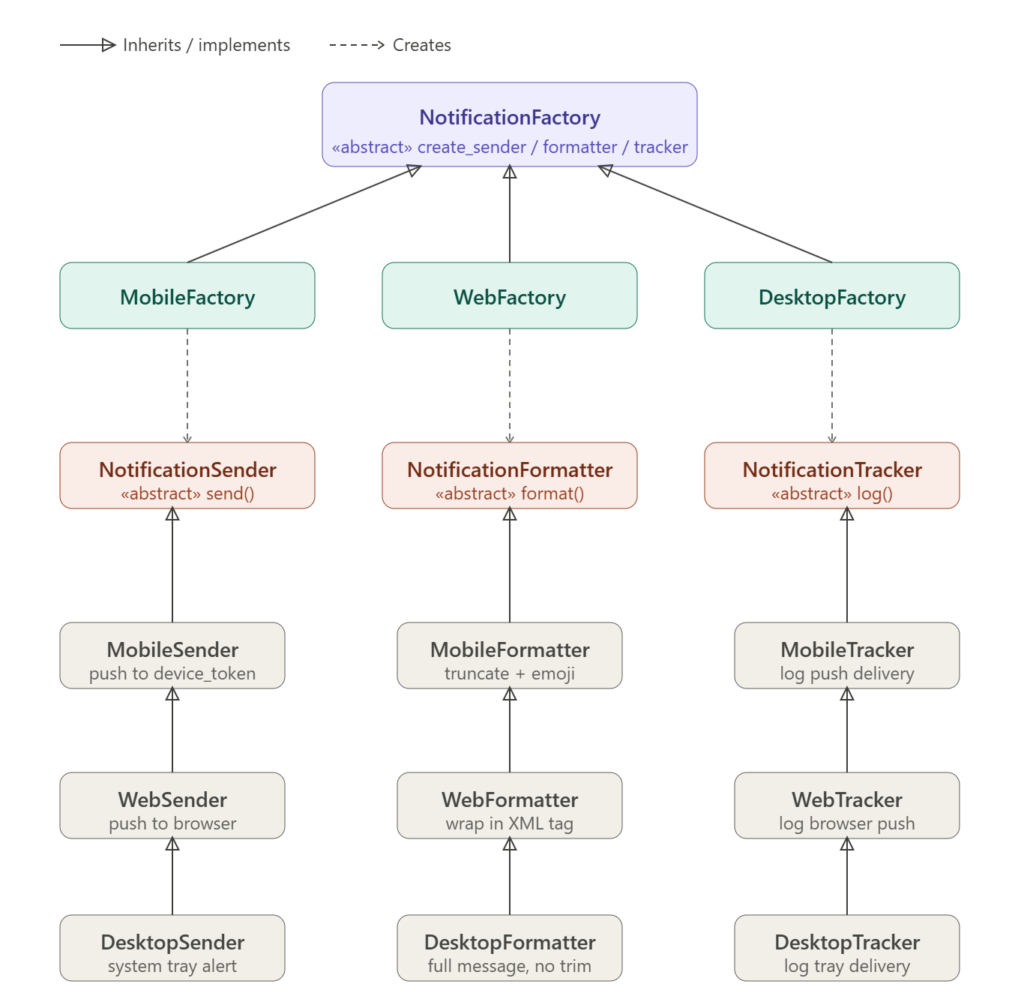
Abstract Factory vs. Factory: What’s the Difference?
This is the question everyone has after reading both, so let’s be direct about it.
Factory creates one product. You ask for a sender, you get a sender. The factory’s job ends there.
Abstract Factory creates a family of related products. You ask for a notification kit, you get a sender, a formatter, and a tracker — all matched to the same platform. The factory’s job is to ensure the whole family is consistent.
A side-by-side comparison:
# Regular Factory — one object, one decision
sender = NotificationSenderFactory.get_sender("mobile")

# Abstract Factory — whole family, one decision
factory   = get_notification_factory("mobile")
sender    = factory.create_sender()     # MobileSender
formatter = factory.create_formatter()  # MobileFormatter  ← guaranteed to match
tracker   = factory.create_tracker()    # MobileTracker    ← guaranteed to match
The key word is guaranteed. With a regular factory you can mix and match — accidentally or intentionally. With an Abstract Factory, the factory class itself enforces the relationship. Every product it creates belongs to the same family.
When should you use which?
- Use Factory when you need one object and the variants are independent of each other.
- Use Abstract Factory when you need multiple objects that must be consistent with each other — UI themes, platform-specific components, environment-specific service sets (test vs staging vs production).
If you only have one product type, Abstract Factory is overkill. If your products come in matched sets, it’s exactly the right tool.
What About Thread Safety?
The Abstract Factory itself is stateless — create_sender(), create_formatter(), and create_tracker() just instantiate and return new objects each time. Stateless factories are inherently thread-safe; there’s nothing to race over.
The get_notification_factory resolver does build a dictionary of factory instances, but since that dictionary is constructed fresh on every call and never mutated, concurrent reads are safe too.
If you convert the resolver into a singleton (a reasonable choice to avoid rebuilding the dictionary on every call), apply the same double-checked locking pattern from the Singleton post:
import threading

class NotificationFactoryRegistry:
    _instance = None
    _lock = threading.Lock()

    def __new__(cls):
        if cls._instance is None:
            with cls._lock:
                if cls._instance is None:
                    instance = super().__new__(cls)
                    instance._factories = {
                        "mobile":  MobileNotificationFactory(),
                        "web":     WebNotificationFactory(),
                        "desktop": DesktopNotificationFactory(),
                    }
                    cls._instance = instance
        return cls._instance

    def get(self, platform: str) -> NotificationFactory:
        if platform not in self._factories:
            raise ValueError(f"Unknown platform: '{platform}'")
        return self._factories[platform]

# Usage
registry = NotificationFactoryRegistry()
factory  = registry.get("mobile")
One registry, built once, thread-safe, reused everywhere. The Singleton, Factory, and Abstract Factory patterns all working together.
Other Places Abstract Factory Earns Its Keep
UI theming A dark mode / light mode toggle is a classic Abstract Factory scenario. DarkThemeFactory produces a matched set of button, input, modal, and tooltip components all styled for dark mode. Switch to LightThemeFactory and the entire UI swaps consistently — no chance of a dark button next to a light modal.
Environment-specific service sets Test, staging, and production environments often need different implementations of the same services — a real S3 client in production, an in-memory mock in tests, a local MinIO instance in staging. An EnvironmentFactory produces the right set of service objects for the current environment in one shot.
Cross-platform SDKs Libraries that run on multiple operating systems (Windows, macOS, Linux) use Abstract Factory to produce platform-appropriate file system handlers, clipboard managers, and system dialog boxes — all matched to the OS, all behind the same interface.
The Takeaway
The Abstract Factory pattern is the right tool when:
- Your objects come in matched families that must be consistent with each other
- You want to enforce that consistency at the structural level, not just by convention
- You need to swap entire families at once — by platform, environment, theme, or configuration
Don’t reach for it when your products are independent of each other — a regular Factory handles that with less ceremony. But when you catch yourself saying “these three things always need to match,” Abstract Factory is exactly what you’re looking for.
One factory. One family. Guaranteed to fit together. That’s the whole idea.